DialerGiants
Introduction
This guide explains how to change campaign in VICIdial for both administrators and agents. It covers UI methods, when a logout/login is required, quick SQL techniques for advanced admins, and safe troubleshooting steps to avoid dropped calls or misconfigured agent settings. Use these procedures in your staging environment first and always backup your database before running queries.
Who should read this
- Call-center admins managing VICIdial deployments.
- Telephony engineers and sysadmins who configure campaigns and lists.
- System integrators building custom agent workflows.
Quick answer (short)
- Admins can change an agent's campaign via the Real-Time interface (User Status) or by updating vicidial_live_agents records.
- Some campaign settings are loaded at agent login; changing certain settings without logout may not apply until the agent reconnects.
Understanding VICIdial campaign architecture
VICIdial ties several tables and UI settings together to define campaign behavior: vicidial_campaigns (stores campaign configuration), vicidial_live_agents (contains current agent sessions and campaign_id), vicidial_campaign_agents (maps agents to campaigns and controls permissions). Many campaign-specific settings are loaded at login and cached for that session.
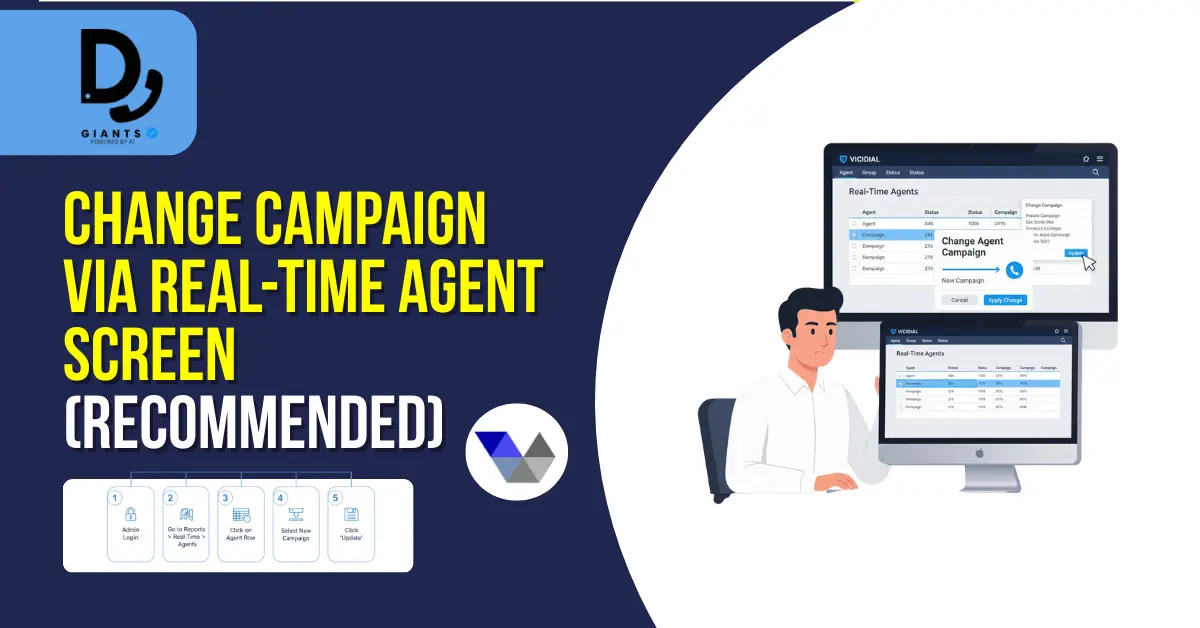
Change campaign via Real-Time Agent screen (recommended)
This is the safest, UI-driven method for switching an agent's active campaign.
- Log into VICIdial as an admin with appropriate permissions.
- Navigate to Reports → Real-Time → Agents.
- Click the agent row you want to modify — a User Status or agent pop-up opens.
- In that modal, locate Current Campaign and pick the new campaign from the dropdown.
- Click Update/Save. The agent will begin receiving calls for the new campaign shortly.
Change campaign via Admin → Campaigns (for configuration)
If you need to modify campaign definitions (not just assigning an agent):
- Admin → Campaigns (from the VICIdial admin menu).
- Select the campaign you want to edit.
- Update desired fields: campaign name, dial method, lists assigned, caller ID.
- Save changes.
Advanced: change campaign using SQL (use with extreme caution)
-- Backup first
CREATE TABLE backup_vla_$(date +%s) AS SELECT * FROM vicidial_live_agents WHERE user='1001';

-- Change campaign_id for a live agent
UPDATE vicidial_live_agents
SET campaign_id='NEW_CAMPAIGN_ID'
WHERE user='AGENT_USERNAME'
AND server_ip='YOUR_SERVER_IP';
When you must logout and why
Many VICIdial settings are read and cached during the agent login process. Cases where logout/login is required: you changed the campaign dial method (e.g., from MANUAL to AUTO), updated campaign-specific agent settings, or agents do not see updated scripts/caller IDs.
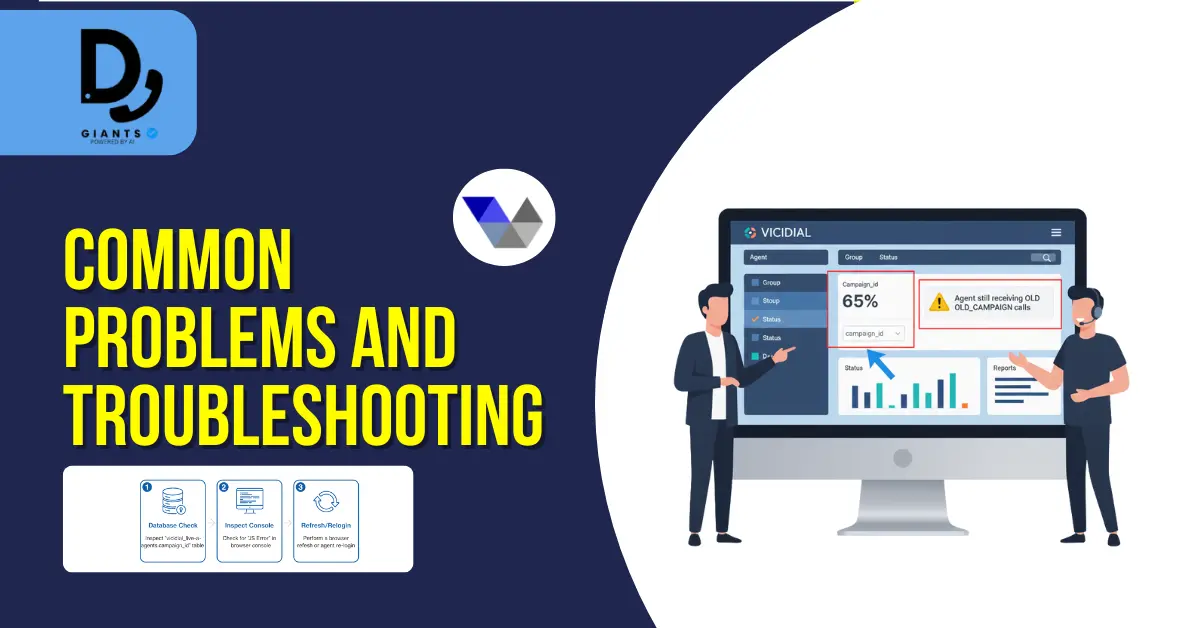
Common problems and troubleshooting
- Agent still receiving calls from old campaign: Confirm vicidial_live_agents.campaign_id value, check agent browser console, force UI refresh or re-login.
- New campaign settings not applied: Identify which settings are dynamic vs login-loaded.
- Calls not routing to the agent after change: Verify lists assigned to campaign still contain active leads, check dial level and campaign status.
Best practices & rollback plan
- Backup: Always backup vicidial_live_agents and vicidial_campaigns before mass changes.
- Test Staging: Try changes on a staging server first.
- Use the UI: Prefer Real-Time UI operations for single-agent changes.
- Document: Keep a change log with timestamps, admin user, and reason.
- Rollback: Keep backup SQL ready to revert vicidial_live_agents if needed.
Checklist before changing campaigns
- Backup vicidial_live_agents and vicidial_campaigns.
- Notify agents & supervisors.
- Test change on 1-2 agents.
- Monitor Asterisk and VICIdial logs post-change.
- Have rollback SQL ready.
FAQ
Q: Can agents switch campaigns without logging out?
A: Not reliably. Some campaign
elements are fixed at login; while DB edits can switch campaign_id, session behavior may not fully update
without logout.
Q: Is it safe to change campaign_id via SQL?
A: Only for experienced DB admins, and only
with backups. The UI may not update live.
Q: Can I schedule campaigns to start/stop automatically?
A: VICIdial supports scheduling
approaches via campaign scheduler discussions and community plugins; behavior can differ by version.
Conclusion
Changing campaigns in VICIdial might seem complex at first, but once you understand the core settings — from agent-level switching to admin campaign configuration — it becomes a routine process. Whether you're managing multiple outbound campaigns or fine-tuning inbound performance, mastering this process ensures your call center operates efficiently and without downtime. Always remember to verify campaign IDs, train agents, backup configuration data, and use test campaigns to validate new setups before deploying them live.