DialerGiants
Introduction
Can you use VICIdial on your phone? Absolutely! In today's dynamic business landscape, mobile access to call center functionalities is more critical than ever. This guide provides a comprehensive breakdown of how to effectively leverage VICIdial, a popular open-source contact center solution, directly on your mobile device. We'll explore the various mobile app options available, how to seamlessly integrate SIP softphones, and essential security measures to ensure reliable and secure communications on the go.
Imagine empowering your agents with the flexibility to manage calls, access real-time reports, and stay connected from anywhere—without being tethered to a desk. But what if the reality falls short of this ideal? Mobile connectivity challenges, security concerns, and limited feature parity can often create a frustrating experience. Understanding and overcoming these hurdles is key to unlocking the full potential of mobile VICIdial.
How VICIdial Mobile Access Works
Using VICIdial on your phone is achievable through multiple methods, each catering to different user needs and technical setups.
Official Mobile Apps (Reporting vs. Calling)
VICIdial offers dedicated mobile apps for Android and iOS, primarily designed for managers and supervisors to access real-time reports and campaign summaries on the go. These apps provide snapshot views of agent activity, call counts, and performance metrics but do not support direct dialing or call handling from the phone itself.
Browser-Based Agent Interface
For agents, the most common mobile access method is through a mobile-optimized web interface. This interface allows agents to log in via their phone's browser and manage calls, but it requires integration with a SIP or IAX2 softphone app to handle the actual voice traffic.
Third-Party Softphone Integration
To make and receive calls on a mobile device, agents often use third-party softphone applications such as Zoiper or Bria. These apps register with the VICIdial server using SIP credentials, allowing the phone to act as a VoIP endpoint.
Step-by-Step Mobile Setup Guide
Setting up VICIdial for mobile use requires careful configuration on both the server and device sides to ensure smooth call handling and reliable connectivity.
Configuring VICIdial for SIP Mobile Connections
The foundation of mobile call handling with VICIdial lies in correctly configuring the server to accept SIP or IAX2 connections from mobile devices. This involves setting up SIP trunks and ensuring the server's firewall and NAT (Network Address Translation) settings allow inbound and outbound traffic on the necessary ports. Common SIP ports include 5060 for signaling and a range for RTP (Real-time Transport Protocol) media streams. It's crucial to disable SIP ALG (Application Layer Gateway) on routers, as it often interferes with SIP packets, causing call drops or one-way audio issues.
Mobile Device Requirements
On the device side, agents should use smartphones running recent versions of Android or iOS to guarantee compatibility with softphone apps. These devices should have sufficient RAM and processing power to handle simultaneous voice processing and app operations without lag. A quality headset with a built-in microphone is highly recommended to improve call clarity and reduce background noise.
Battery life is another critical consideration. Prolonged call sessions can drain mobile batteries quickly, so agents should optimize device settings—such as disabling unnecessary background apps and adjusting screen timeout—to conserve power during shifts.
Security Protocols for Public Networks
Since mobile agents often connect through public Wi-Fi or cellular networks, securing these connections is paramount. Implementing VPN (Virtual Private Network) access to the VICIdial server encrypts data traffic, protecting sensitive call information from interception. Furthermore, enabling TLS (Transport Layer Security) and SRTP (Secure Real-time Transport Protocol) on the SIP server adds layers of encryption for signaling and media streams, respectively.
Two-factor authentication (2FA) for agent logins provides an additional security barrier, ensuring that only authorized users can access the system.
Overcoming Mobile-Specific Challenges
Using VICIdial on mobile devices offers great flexibility, but it also introduces unique challenges that can impact call quality, device performance, and user experience.
Cellular Network Limitations
One of the most common hurdles for mobile VICIdial users is network variability. Cellular carriers often implement SIP port blocking or restrict certain types of VoIP traffic, which can cause call drops or one-way audio problems. For instance, ports like 5060 (used for SIP signaling) may be blocked or throttled, disrupting call setup and stability.
To troubleshoot these issues, agents and administrators should test calls over different networks—Wi-Fi, 4G, and 5G—to compare performance. Monitoring RTP packet loss using diagnostic tools can help identify where audio degradation occurs. Adjusting server-side jitter buffers or switching to more resilient codecs can mitigate these effects.
Battery and Data Consumption
Mobile VICIdial use can be resource-intensive. Continuous VoIP calls, running softphone apps, and maintaining SIP registrations drain battery life quickly. To extend device uptime, agents should close unnecessary background apps and disable features like Bluetooth or GPS when not needed. Using low-bandwidth codecs such as G.729 instead of G.711 reduces data usage and processing load, which also conserves battery power.
Dual-SIM Workflows for Hybrid Use
Modern smartphones often support dual-SIM functionality, allowing users to separate personal and work communications on the same device. For VICIdial agents, this means dedicating one SIM card to handle VoIP traffic and the other for personal calls and data. This separation helps manage network priorities and reduces conflicts caused by carrier restrictions or data usage caps.
Future-Proofing Mobile VICIdial
As mobile technology and VoIP solutions continue to evolve, staying ahead of emerging trends is essential for call centers leveraging VICIdial on mobile devices.
WebRTC Adoption (No App Needed)
WebRTC (Web Real-Time Communication) is a game-changer for mobile VICIdial users. Unlike traditional softphone apps that require installation and configuration, WebRTC enables voice and video calls directly through modern web browsers without any additional software. This means agents can access VICIdial's call center functions simply by opening a browser on their phone, streamlining the user experience and reducing technical barriers.
Several VICIdial community projects and commercial add-ons are actively developing WebRTC-compatible interfaces, allowing agents to log in from any device with a modern browser—be it Android, iOS, or desktop.
eSIMs for Global Roaming Agents
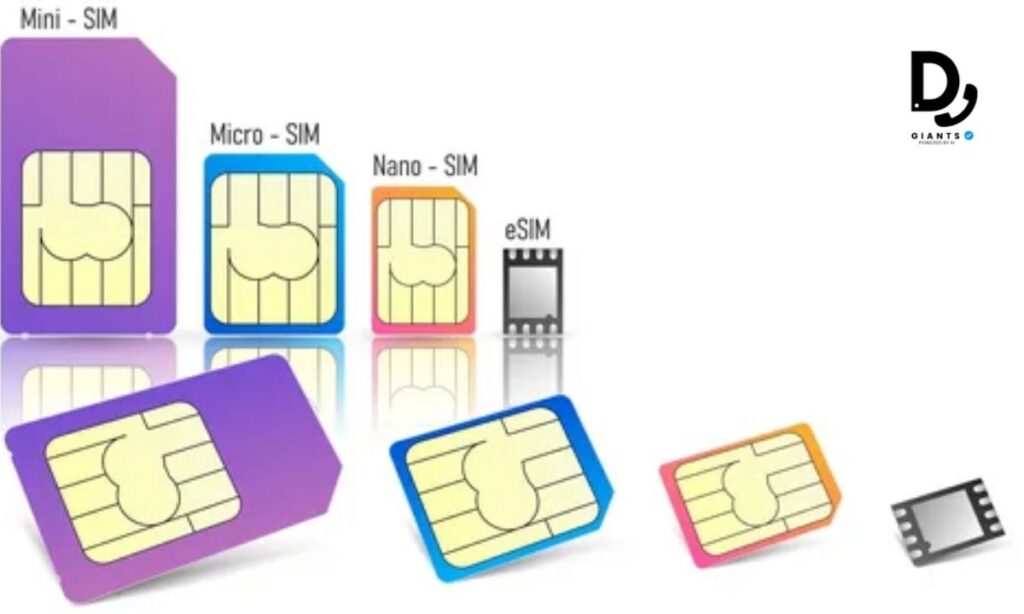
Another emerging technology transforming mobile VICIdial use is the eSIM (embedded SIM). Unlike traditional physical SIM cards, eSIMs are programmable chips embedded in smartphones that can store multiple carrier profiles. This enables agents to switch between mobile networks without swapping SIM cards, a significant advantage for global or remote teams.
For international campaigns, eSIMs allow agents to maintain local phone numbers and data plans wherever they are, reducing roaming charges and improving call quality. Configuring eSIMs involves provisioning carrier profiles via QR codes or carrier apps, which can be managed remotely by IT administrators.
Frequently Asked Questions (FAQs)
Can I make calls directly from the official VICIdial mobile app?
No, the official VICIdial mobile apps for Android and iOS focus on reporting and real-time campaign monitoring. To make and receive calls, agents typically use a mobile browser interface combined with a SIP softphone app.
What softphone apps work best with VICIdial on mobile?
Popular options include Zoiper and Bria, which support SIP/IAX2 protocols and integrate smoothly with VICIdial for call handling on smartphones.
Is it safe to use VICIdial on public Wi-Fi?
Yes, but you should use VPNs and enable TLS/SRTP encryption to secure your calls and data when connecting over public or untrusted networks.
Can mobile VICIdial handle international roaming?
Absolutely. With emerging eSIM technology, agents can switch carrier profiles easily, reducing roaming costs and improving call quality globally.
Conclusion
Using VICIdial on your phone is not only possible but highly effective when set up correctly. With the right configurations—ranging from SIP trunk setup and mobile device compatibility to robust security protocols—mobile agents and managers can access powerful call center functionalities remotely. This flexibility is especially enhanced when VICIdial is deployed as a cloud-hosted VICIdial solution, enabling seamless remote call center operations without the constraints of traditional desktop environments.
By embracing mobile access, organizations can expand their workforce capabilities, improve agent productivity, and maintain real-time oversight from anywhere. Whether through mobile apps for reporting or softphone integrations for call handling, VICIdial's mobile ecosystem supports modern, scalable contact centers designed for the demands of today's distributed workforces.